
Scanned a Micro-Market Item Twice? Check the Basket Before Paying
If you scan one snack at a micro-market checkout and see it listed twice, pause before paying. Check the basket against the items you are buying and use the checkout’s supported correction process. Do not assume that another beep, a second scan or moving the item away will remove the extra entry. The correct action depends on the installed checkout, so follow its instructions or ask for help.
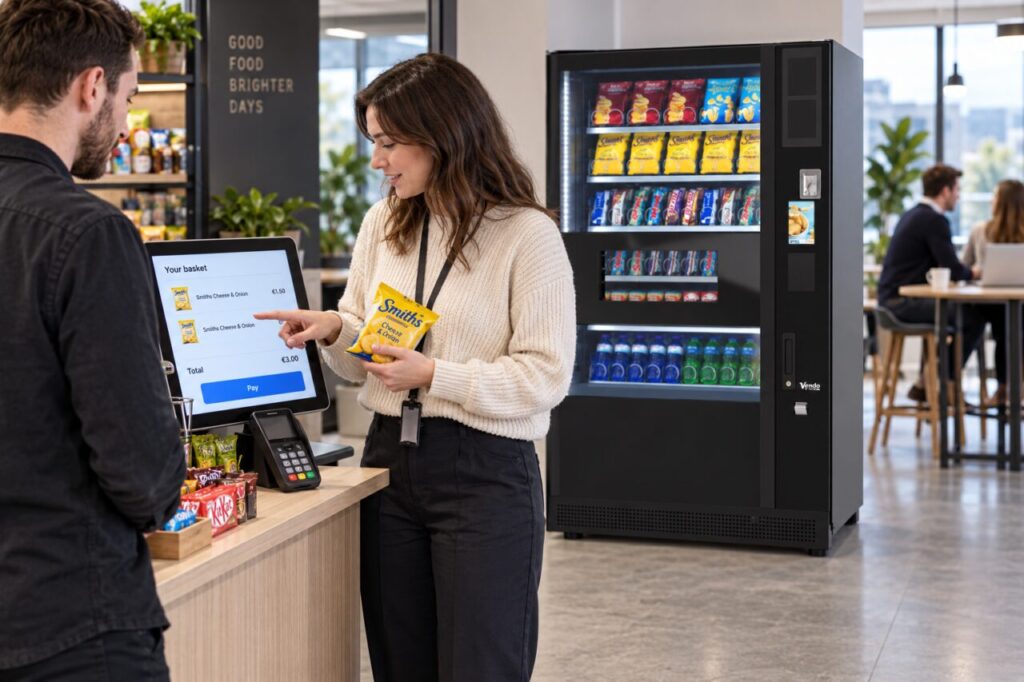
Compare the basket with the physical items
Look at the product name, quantity and total on the screen. Two lines may represent two entries, while a single line may show a quantity of two. Confirm what is displayed before deciding there is a duplicate. If you genuinely have two identical items, both need to be included. The useful check is whether the basket matches the purchase, not simply whether a product name appears more than once.
Keep the items you are buying together while you review the screen. If shopping with a colleague, establish which items belong to your transaction before proceeding. This avoids correcting a basket based on the assumption that an item belongs to the other person. Do not use a different product’s barcode to compensate for a scanning problem or to force the total to a preferred amount.
Use the available correction route
Follow the checkout’s displayed option for changing quantity or removing an item, if one is provided and the process is clear. Some corrections may require assistance. Do not guess a sequence based on a different retailer’s equipment. A micro market and a conventional vending machine have different purchase journeys, as discussed in our micro-market overview.
After making a correction, read the basket again before payment. Check both the quantity and total rather than relying only on an animation or sound. If the screen remains unclear, use the posted help route. Avoid abandoning an active transaction for the next customer without following the supported cancellation or assistance process; the next person needs a clearly separate starting point.
Separate before-payment and after-payment problems
If payment has not been completed, the priority is to correct or properly cancel the current basket. If payment has completed, report the purchase through the operator’s stated process. Keep the receipt or transaction reference where available and explain that one physical item appeared to have been counted twice. Do not describe an assumed technical cause as an established fact.
Provide the location, approximate time, product and amount through the appropriate private channel. Follow the operator’s guidance on any additional information needed. Do not post personal payment details on a public feedback board. A clear report helps the responsible team review the transaction, but it does not establish a particular refund outcome or time before the case has been assessed.
Help the site improve the instructions
For site hosts, repeated reports of the same confusion are worth raising with the provider. Record the step people found difficult, such as recognising a quantity field or finding the supported help option. Ask the provider to review the instructions and checkout behaviour. Avoid inventing a local shortcut that has not been confirmed for the installed system.
Test any revised guidance with an agreed example before sharing it widely. Keep the explanation close to the purchase journey and separate it from promotional messages. Staff should know where to direct a customer who remains uncertain, without being expected to operate restricted checkout controls. A small, clear correction route can make the experience easier while preserving an accurate record of what was actually purchased.
Contact us to discuss the customer journey for a proposed workplace refreshment area.
Related guidance: Two Identical Items at a Micro Market: Check the Checkout Quantity.