
Buying loose fruit in a micro-market: by the piece or by weight?
Before adding loose fruit to a workplace micro-market basket, check whether the shelf price is per piece or per kilogram. Two apples may mean entering a quantity of two, weighing them together, or scanning a pre-weighed label. Follow the method shown for that particular product and checkout. The fact that the packaged snack beside it has a barcode tells you nothing about how the loose fruit is sold.
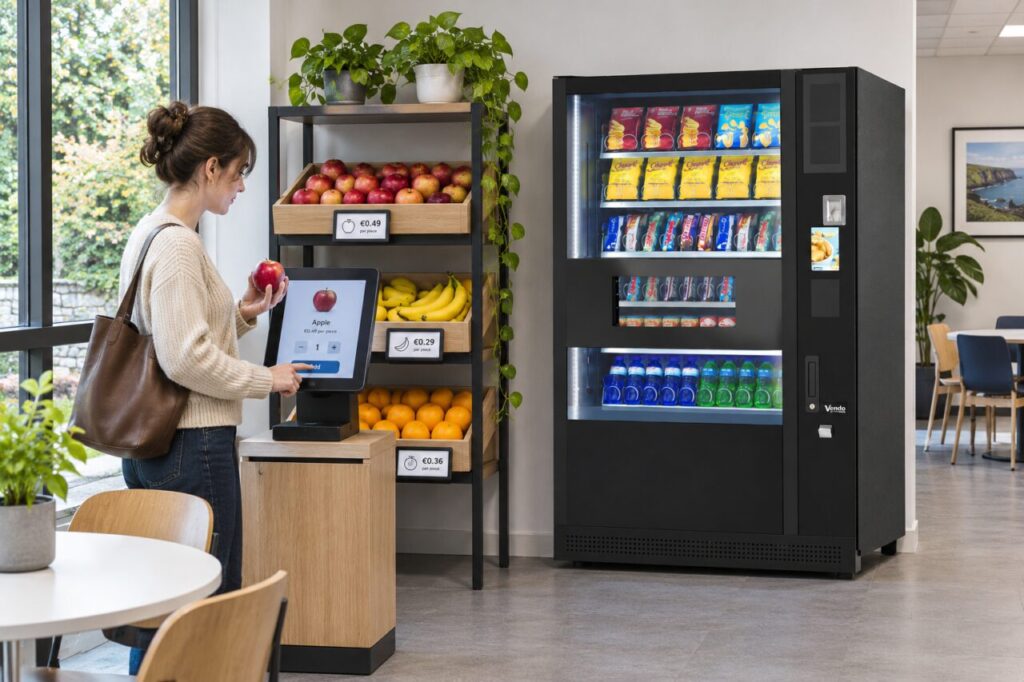
Read the unit next to the price
A ticket saying seventy cent each gives a total of €1.40 for two apples. A ticket saying €3 per kilogram gives a different calculation. If two apples weigh 350 g together, the fruit costs €1.05 at that illustrative rate. The number of apples alone cannot establish the weight-based total. These examples explain two pricing methods and are not prices for any particular workplace.
The Competition and Consumer Protection Commission explains distinctions between unit pricing, loose goods sold by weight and products commonly sold individually in its Irish product pricing guidance. If you run the site, ask the operator to confirm the appropriate display for its actual selling method. Make the customer-facing unit legible beside the product it describes.
Match the shelf to the checkout
Look for the specific fruit and variety on the screen. If two similar items are sold differently, read the unit on each tile before choosing. For an item sold by the piece, check the quantity in the basket. For an item sold by weight, follow the operator’s weighing or label instructions. Some setups may only support one method. Customers should never have to guess a weight because a screen asks a question the shelf does not explain.
Review the basket before paying. If the screen adds a single apple after you chose two, correct the quantity through the offered controls. If a second touch adds another complete line, check both lines before trying again. The guide to a shelf and checkout price mismatch explains what to record when the displayed information conflicts.
What to do when there is no clear match
Use the posted support route if the label is missing, a weighing step is unavailable or the screen gives only a different fruit. Tell the operator the item, shelf position, displayed unit and checkout option. A clear description of the mismatch helps more than a general report that the till is expensive. Avoid using a cheaper item as a substitute code or taking produce before the transaction is resolved.
Test loose produce before introducing it
A site trial should follow a single apple, two apples and a removed item all the way from the shelf to a correct basket total. Ask someone unfamiliar with the layout to do the trial. Watch which label they read and whether they can undo a mistaken choice without assistance. A successful demonstration by the person who configured the system may conceal an unclear step for everyone else.
When comparing a micro-market with conventional vending, list the buying steps for the actual foods you want to offer. Packaged products and loose fruit can put different demands on the checkout and on the staff supporting it. Resolve those details before committing shelf space to a range the site cannot sell clearly.