Will any USB-C cable from a vending machine fast charge?
A USB-C cable can fit your phone and still charge it more slowly than you expect. The connector tells you which socket it fits. The result also depends on the cable’s power capability, the charger and what the device accepts. Before buying from a vending machine, look at both ends of the cable and the charger you intend to use.
Check the two plugs first
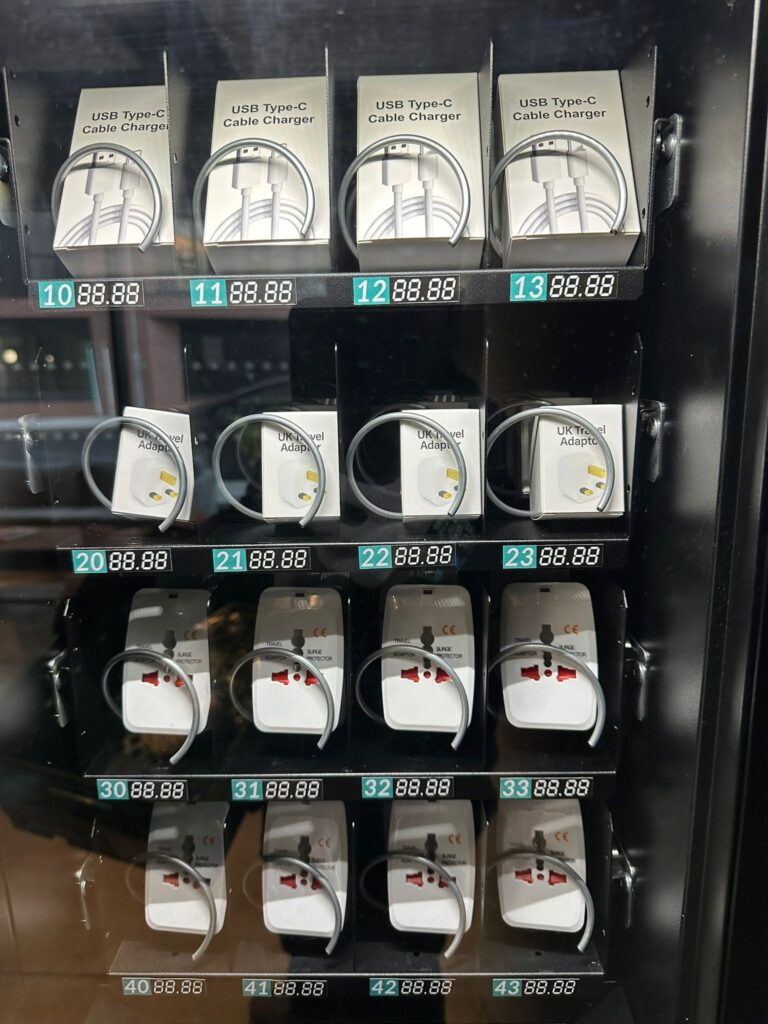
Someone at reception might lend you a power adaptor with a rectangular USB-A socket. A cable with a small oval USB-C plug at both ends will not fit that adaptor. Another visitor might have a USB-C laptop charger and need a cable with the same connector at both ends. “Phone charging cable” would be a poor selection label for either buyer.
Take the charger out of your bag and compare its socket with the package illustration. Then check the socket on the device. If the cable comes without a mains charger, decide where you can use it before paying. A cable on its own cannot turn a conventional wall socket into a USB outlet.
Read the USB-C cable power rating
Look for a power rating in watts where the manufacturer provides one. USB-IF’s cable certification guidance explains the 60 W and 240 W power markings for USB-C to USB-C cables in its compliance programme. Those figures describe the cable’s capability. They do not promise a particular charging speed for every device connected to it.
For example, imagine a phone that accepts up to 20 W with its specified charger. Buying a higher-rated compatible cable does not make that phone accept 60 W. Equally, a cable suitable for a phone may fall short of a laptop manufacturer’s stated requirement. Check the device maker’s guidance if you need to power a laptop while working. The shape of the connector alone cannot settle that question.
Charging and transferring files are different purchases
A visitor may need to copy photographs as well as charge a phone. Check the cable’s stated data capability separately. The USB-IF guidance distinguishes power markings from data-rate markings. A large wattage on the front of a box gives no specific transfer speed. If the pack lists only charging features, ask about data support before buying it for a file transfer.
Consider length too. A short lead might suit a power bank in a coat pocket but be awkward beside a fixed desk socket. Look for an actual length on the pack. A photograph of a coiled cable can make a short and a long version look much the same behind vending glass.
What to put beside the selection number
For the person stocking the machine, a concise label can answer four questions. Which connectors are present? How long is the cable? What power capability does the supplier document? Does the purchase include a charger? Keep the supplier’s product sheet with the stock record so that someone can answer a more detailed enquiry.
When you switch supplier, compare the replacement packet against the label before refilling the row. Two boxes marked Type-C can contain cables with different connectors at the other end. If a buyer reports slow charging, ask which device and charger they used and which selection they bought. That gives support a starting point without assuming the cable is faulty.
For help choosing products for a shared building, contact Vending-Machines.ie with the device and accessory requests you receive.
Related guide: choosing a travel adaptor in Ireland.