
A Coat Stand Hides Part of a Vending Machine: Check the Customer View Again
A coat stand is moved into a break area and suddenly the lower vending selections are harder to see. The machine has not changed, but the customer journey has. Treat the obstruction as a layout issue to review with the site contact, rather than assuming customers will lean around it or move other people’s belongings.
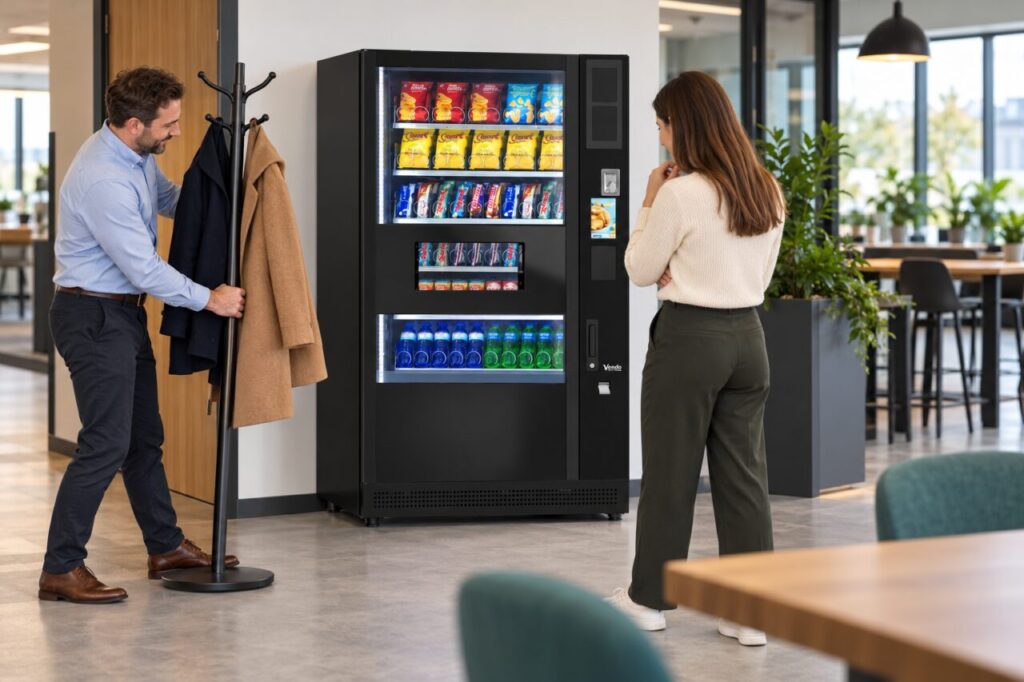
The same problem can arise with a temporary display, umbrella holder or freestanding notice. An object may appear harmless from the doorway while blocking a price, collection area or support notice from the position where somebody actually uses the machine.
Look from the purchase position
Stand where a customer would choose an item and check the whole sequence. Can they see the product and its corresponding selection information? Can they identify the controls without reaching around a hanging coat? After buying, can they see where the item is collected and move away comfortably?
Repeat the check with the coat stand in normal use. An empty stand is not the same shape as one holding bulky jackets and bags. Observe the space during an ordinary busy period, without photographing customers or their belongings unnecessarily. The aim is to understand the obstruction, not to judge how people use the room.
Identify what must stay clear
Separate customer access from the operator’s working space. A stand might leave enough room for a quick purchase while obstructing a refill or service visit. Ask the operator about the access needed for the installed equipment and check the site’s own requirements before agreeing a new position.
Do not use the cabinet as a coat hook or attach an improvised holder to it. Avoid moving the machine, opening panels or covering vents to make the furniture fit. A room-layout problem should be solved through the responsible site team, with equipment changes handled through the appropriate supplier or authorised personnel.
Agree a practical alternative location
Choose somewhere that people will actually use. Moving the stand to an inconvenient corner may simply cause coats to return to the vending area. Ask the room’s users where outerwear normally goes, and consider the route between the entrance, seating and machine when deciding the alternative.
Check that the new position does not create a different obstruction elsewhere. The building team should decide whether the proposed arrangement suits the room and its circulation requirements. Record the agreed location on a simple room note or photograph of the empty space, if useful, rather than inventing a universal clearance measurement.
Recheck the information customers need
Once the object has moved, check any notices it previously hid. A support contact or price instruction may be outdated as well as obscured. Correct the information through the person responsible for it, and avoid covering the original machine instructions with a large new sign that creates another visibility problem.
Ask a colleague who was not involved in the move to make a normal visual check from choosing to collection. They may notice a lower selection or instruction that the regular site contact overlooks. If visibility remains difficult, describe the specific location and lighting conditions to the operator rather than claiming the furniture move solved everything.
Include the area in ordinary room reviews, especially after seasonal coat storage or furniture changes. A small layout agreement can prevent repeated inconvenience without making vending access depend on customers rearranging the room. Keep the solution understandable to the cleaning team and anyone who resets the furniture after meetings.
Related guidance: read Office Desks Have Moved: Recheck the Vending Queue and Collection Space for the connected question.
Send a description of the proposed location and access concerns with your enquiry.